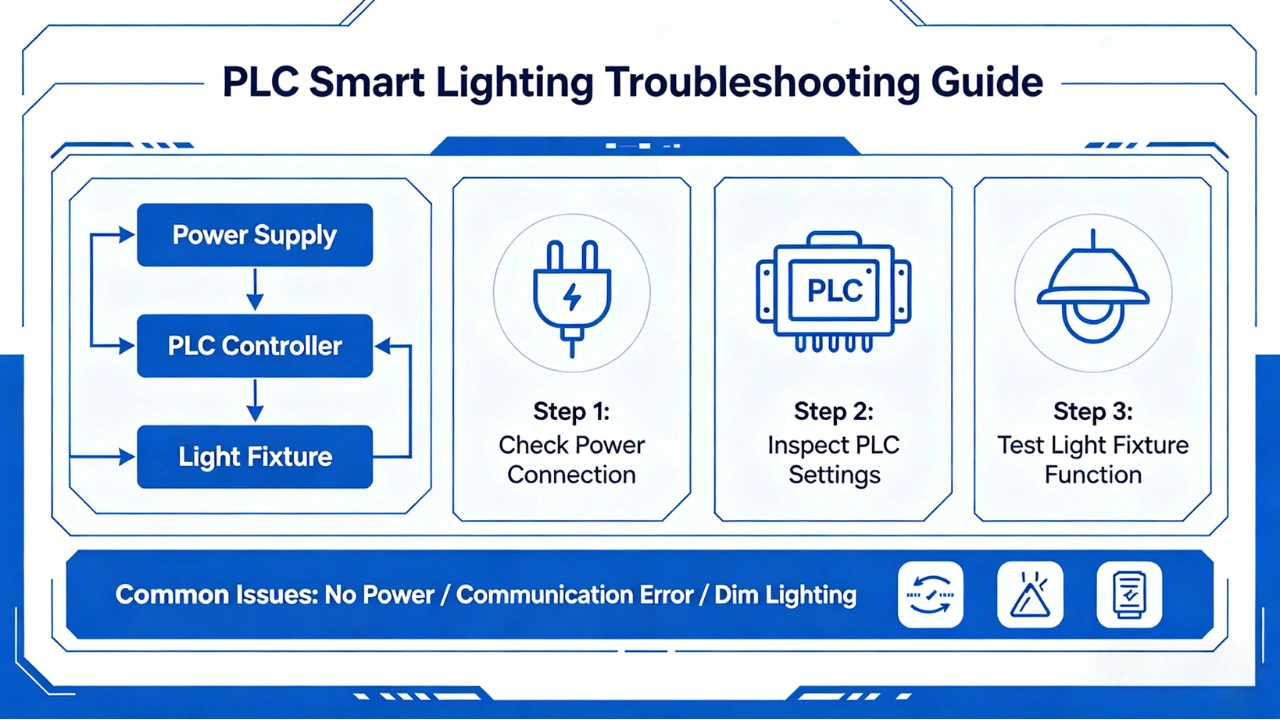
This PLC troubleshooting guide for smart lighting systems helps you quickly diagnose and fix common communication, power, and fixture failures.
Power Line Communication (PLC) technology has become a reliable backbone for modern smart lighting systems, especially in street lighting, industrial parks, tunnels, campuses, and large commercial areas. By transmitting data over existing power cables, PLC simplifies installation and reduces infrastructure costs.
However, like any communication technology, PLC networks can occasionally experience performance issues. Understanding the most common PLC problems—and how to troubleshoot them—can significantly improve system reliability and reduce maintenance time.
This guide covers the most frequent PLC troubleshooting scenarios in smart lighting systems and practical solutions used by field engineers.
Why PLC Troubleshooting Matters in Smart Lighting
A properly configured PLC smart lighting system typically delivers:
- Stable communication over long distances
- Reliable lamp control and monitoring
- Real-time fault detection
- Reduced maintenance costs
- High network uptime
When communication problems occur, they can lead to:
- Lamps not responding
- Delayed switching commands
- Missing energy data
- Network instability
- Partial lighting failures
Most issues, however, are not caused by hardware defects—but by installation conditions, power quality, or network configuration. You can also see IEEE standards for power line communication systems
Common PLC Problems and How to Fix Them
1. No Communication Between Controller and Lights
Symptoms
- Lamps do not respond to commands
- Controller shows devices offline
- No data feedback from nodes
- Newly installed lights fail to join the network
Possible Causes
- Incorrect phase connection
- Transformer isolation blocking signal
- Wiring discontinuity
- Incorrect device addressing
- Power line interference
Troubleshooting Steps
Step 1 — Verify Power Supply
Ensure the lighting circuit is powered and stable. Check:
- Input voltage
- Circuit breakers
- Power continuity
Step 2 — Check Phase Matching
PLC signals usually communicate within the same phase.
If devices are connected across different phases, communication may fail.
Solution:
Install phase couplers to bridge PLC signals across phases.
Step 3 — Inspect Transformer Boundaries
PLC signals generally cannot pass through transformers.
Solution:
Install PLC repeaters or communication gateways on both sides of the transformer.
Step 4 — Reconfirm Device Addressing
Ensure:
- Each device has a unique ID
- Network parameters are correct
- Device firmware is compatible
2. Weak PLC Signal Strength
Symptoms
- Intermittent communication
- Random device disconnection
- Slow response time
- Reduced communication range
Possible Causes
- Long cable distance
- Cable aging or damage
- High electrical noise
- Poor grounding
- Multiple branching circuits
Troubleshooting Steps
Step 1 — Measure Communication Distance
Verify that cable length does not exceed recommended limits.
Typical PLC distances:
- Low Voltage PLC: 300–1500 meters
- With Repeaters: Up to several kilometers
Step 2 — Check Cable Condition
Inspect for:
- Loose terminals
- Corrosion
- Insulation damage
Replace aging cables when necessary.
Step 3 — Reduce Electrical Noise
Electrical devices such as:
- Variable frequency drives
- Motors
- Switching power supplies
can introduce noise.
Solution:
Install noise filters or isolate noisy equipment.
3. Intermittent Communication Failures
Symptoms
- Devices randomly go offline
- Communication works during some periods but fails later
- Delayed command execution
Possible Causes
- Power load fluctuations
- Electromagnetic interference
- Loose wiring
- Environmental changes
Troubleshooting Steps
Step 1 — Monitor Load Variation
Heavy loads switching on/off may disturb PLC signals.
Solution:
Add signal filters or line conditioning devices.
Step 2 — Inspect Connection Points
Loose terminals are a frequent cause of intermittent faults.
Check:
- Junction boxes
- Controller terminals
- Lamp driver connections
Tighten all connections securely.
4. PLC Network Delay or Slow Response
Symptoms
- Commands take several seconds to execute
- Large network response lag
- Data refresh delays
Possible Causes
- Network congestion
- Too many nodes per segment
- Inefficient network topology
- Outdated firmware
Troubleshooting Steps
Step 1 — Optimize Network Segmentation
Divide large networks into smaller zones.
Typical recommendation:
- 100–300 nodes per segment
Step 2 — Update Firmware
Firmware updates often improve:
- Communication efficiency
- Signal handling
- Network stability
Step 3 — Review Network Topology
Avoid excessive branching.
Use structured topology planning.
5. PLC Devices Frequently Offline
Symptoms
- Same devices repeatedly disconnect
- Offline alarms triggered frequently
- Communication unstable in specific areas
Possible Causes
- Local wiring faults
- Voltage instability
- Defective device
- Environmental interference
Troubleshooting Steps
Step 1 — Check Local Voltage
Ensure voltage levels are within:
- Rated operating range
- Stable without fluctuations
Step 2 — Replace Suspected Devices
If one device repeatedly fails, test by replacement.
Step 3 — Inspect Environmental Conditions
Extreme conditions such as:
- Moisture
- Heat
- Dust
may affect device reliability.
Field Troubleshooting Workflow
Professional engineers often follow a structured workflow to identify PLC issues quickly.
Recommended Troubleshooting Sequence
- Confirm power supply stability
- Verify wiring continuity
- Check phase alignment
- Measure communication distance
- Identify noise sources
- Optimize topology
- Replace faulty components
- Validate network configuration
Following this sequence helps minimize downtime and reduces troubleshooting time.
Tools Recommended for PLC Troubleshooting
Field technicians typically rely on several essential tools:
- PLC signal analyzer
- Multimeter
- Clamp meter
- Network diagnostic software
- Cable tester
- Phase detector
These tools enable faster fault detection and more accurate diagnostics.
Preventive Maintenance Best Practices
Many PLC problems can be prevented with proper maintenance routines.
Recommended Maintenance Tasks
Regular Network Inspection
Check:
- Terminal tightness
- Cable condition
- Grounding systems
Recommended frequency:
- Every 6–12 months
Firmware Updates
Keep firmware updated to:
- Improve stability
- Fix bugs
- Enhance compatibility
Load and Noise Monitoring
Monitor power quality regularly to detect:
- Voltage spikes
- Harmonic distortion
- Electrical noise
Documentation Management
Maintain accurate records of:
- Network topology
- Device addresses
- Installation layout
This greatly simplifies troubleshooting later.
When to Use PLC Repeaters or Couplers
In large smart lighting deployments, signal reinforcement devices are often required.
Use PLC Repeaters When:
- Communication distance is long
- Signal attenuation is high
- Multiple transformers exist
Use Phase Couplers When:
- Devices are on different electrical phases
- Cross-phase communication is required
Proper placement of these components significantly improves network reliability.
Real-World Troubleshooting Example
Consider a large outdoor lighting system in an industrial logistics yard.
Problem
Several lighting poles randomly went offline at night.
Root Cause
A newly installed motor introduced high-frequency electrical noise that interfered with PLC communication.
Solution
Engineers installed:
- Noise suppression filters
- PLC repeater near affected zone
Result
- Communication stabilized
- Offline alarms eliminated
- System reliability restored
This example highlights how electrical noise is often a hidden source of PLC communication issues.
PLC Troubleshooting Checklist
Use this quick checklist during field maintenance:
✔ Power supply stable
✔ Phase alignment correct
✔ Cable connections secure
✔ No transformer isolation without repeater
✔ Electrical noise controlled
✔ Network topology optimized
✔ Firmware updated
✔ Devices properly addressed
Final Thoughts
PLC technology provides a powerful and cost-effective communication solution for smart lighting systems. While occasional communication issues may arise, most problems can be quickly resolved with systematic troubleshooting and proper network design.
By following structured diagnostic methods, maintaining equipment regularly, and applying best installation practices, operators can ensure stable and long-lasting PLC smart lighting performance.